Common account issues and solutions
1. Forgotten password
In case you forgot the password for your JACoW Indico account, or it just doesn't work, it is possible to reset it with a new one. Follow these instructions:
-
Open the link https://indico.jacow.org/reset-password/.
-
Enter the email address linked to your Central Repository account.

- If you are not sure of the correct email address, you can try different addresses here. If it is the wrong address, you will get this error:

- If you get this error, please go back to point 1.
- If you are not sure of the correct email address, you can try different addresses here. If it is the wrong address, you will get this error:
-
Once you are successful, you should see the following screen:

-
You should shortly receive an email containing the reset link like such:
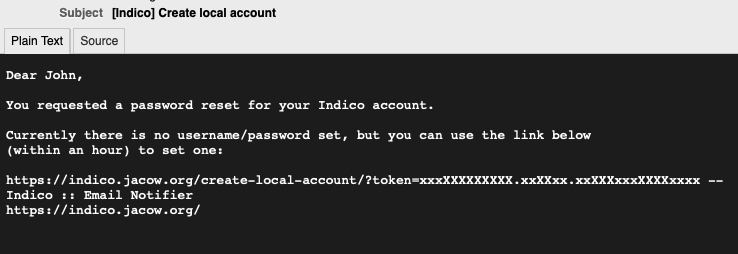
- Check your SPAM folder if you cannot find this in your inbox.
-
Follow the provided link and enter your desired email address, password and confirm your password.
-
You should now be logged in! You can use your email address and password for future logins.
2. Change of email address
It could happen that the email address used for your JACoW Indico account has been deactivated or removed (e.g., due to a job switch).
No worries, in this case you won't be able to receive notifications but you can still use that email address to login to Indico. Then, you can the new email address in your Indico profile:
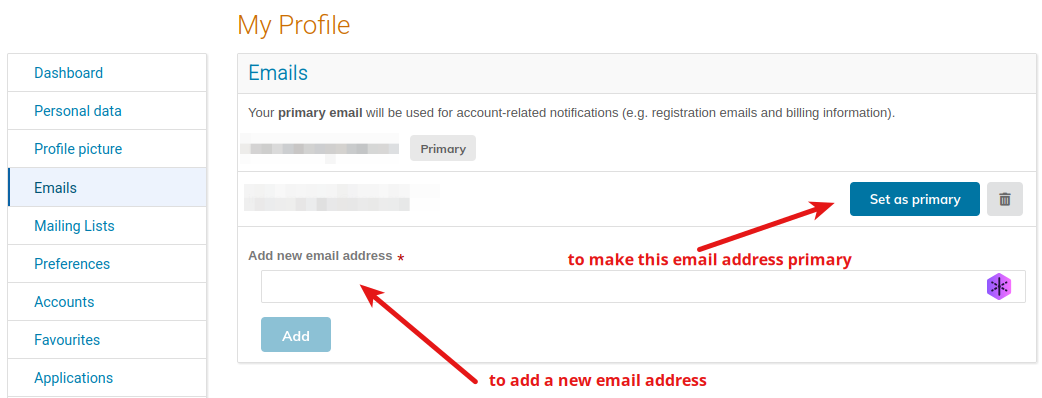
Please note that every new email added needs to be verified: you will receive a confirmation email with a link you need to open. Please note that this link must be opened by the same browser where you are already logged in in Indico.
3. Lost password and email not working
In this case only the JACoW Central Repository Managers can modify your email address. Please send a request to repository-manager@jacow.org. Please note that you will need to prove your identity and confirm the new email address.
4. Multiple accounts to be merged
If you find that you have more than one JACoW Indico account in your name and you wish to merge them, please contact indico-support@jacow.org listing the e-mail addresses of the accounts you wish to merge. You will need to prove that you have ownership of both accounts.